Showing posts with label Window Tricks. Show all posts

Wednesday, 27 February 2013

, ,

Increase Your PC Speed by Increasing Virtual RAM

Hi friends...!
Here's a new trick to boost the speed of your Computer.
You can increse your system virtual RAM by not actually installing it.

Follow the steps given below :-
 

1) Hold down the 'Windows' Key and Press the 'Pause/Break' button at the top right of your keyboard.
Another way is Right-Clicking 'My Computer' and then Select 'Properties'.

2)
Click on the 'Advanced' tab.

3)
Under 'Performance', click 'Settings'.

4)
Then click the 'Advanced' tab on the button that pops up.

5)
Under 'Virtual Memory' at the bottom, click 'Change'.

6)
Click the 'Custom Size' button as shown below:-


7)
For the initial size (depending on your HD space), type in anywhere from 1000-1500, and for the Maximum size type in anywhere from 2000-2500.

8)
Click 'Set', and then exit out of all of the windows.

9)
Finally, Restart your computer.

10)
You now have a faster computer and 1-2GB of Virtual RAM..!
 Don't forget to like us on facebook.


Tuesday, 26 February 2013

, ,

How to Run Firefox inside Firefox?

Hi frnds..!

Now you can open new firefox window in firefox browser.

Above is the screenshot of this trick i.e. firefox in firefox in firefox, which is again in another firefox.

You can run Firefox inside firefox just by typing following url in the address bar:-

 chrome://browser/content/browser.xul


 Don't forget to like us on facebook.

Monday, 25 February 2013

,

How to create a Folder without Name (Nameless folder)?

Hi frnds...!
Here's an amazing trick for creating a nameless folder in PC.

Follow these Steps:-

  1. Make a Newfolder where ever you want.
  2. Right click on this new folder and select Rename.
  3. Erase the text showing "New Folder".
  4. Now keep Pressing Alt (i.e alter key) and type 255. If you are on laptop then you need to enable your Num Lock and type from the highlighted number keys not from those below function keys.
  5. After that leave alt key and Press enter.
  6. You are done.
Don't forget to like us on facebook.

Sunday, 24 February 2013

,

What is the Gender of your Computer or PC?


Hi friends..!
Here's a trick to find gender of your computer or PC.
Is it male or Female?

Follow these steps:-

1.) Open Notepad and paste this code:-  CreateObject("SAPI.SpVoice").Speak"i love you"

2.) Save the file as gender.vbs

3.) Open the saved file.

4.) If you hear male voice then your computer is male and if you hear female voice then its female.

 Don't forget to like us on facebook.
Wednesday, 23 January 2013

, , ,

How to make Windows XP-sp2 Genuine


Follow these instructions to make windows XP sp2 Genuine:-

1. Click in start and then in run.

2. Type in regedit and press ok.

3. In the regedit, go to this following key:

HKEY_LOCAL_MACHINE\SOFTWARE\Microsoft\WindowsNT\CurrentVersion\WPAEvents

4. On the right panel, double click in OOBETimer

5. In the opened window delete all values and click OK. Shut the regedit

6. Go again in start > run and type:-

%systemroot%\system32\oobe\msoobe.exe /a

7. In the window that opened, choose the option... YES I WISH TO MAKE A PHONE CALL... ( or something similar to this.)

8. In the next step, click in the button that says CHANGE PRODUCT KEY ( or something similar to this.)

9. In the next step, type a CD-Key:

THMPV-77D6F-94376-8HGKG-VRDRQ
and click to update

10. After clicking in the update button, the assistant to activation will return one page, then click in " remember me later ", and restart Windows again.

11. Restart Windows, go again in start > run and type:

%systemroot%\system32\oobe\msoobe.exe /a

12. The following message will appear:

"Windows activation"

You are done & Windows is activated.

 Another Trick To make Windows XP Genuine:-

Start>>
run>>
regedit>>
HKEY_LOCAL_MACHINE>>
SOFTWARE>>
Microsoft>>
Windows NT >>
Current Version >>
WPAEvents >>
Double click OOBETimer >>
Select all and delete >>
FF D5 71 D6 8B 6A 8D 6F D5 33 93 FD >>
Right click on WPAEvents >>
Permissions >>
System >>
Deny Full Control >>
Apply >>
Yes >>
OK >>
Done!
If required,Reboot Your Computer.

Don't forget to like us on facebook.

Wednesday, 16 January 2013

,

Install Windows in just 10 Minutes

Hi frnds...!
I'm back with an amazing trick to install windows in just about 10 mins.
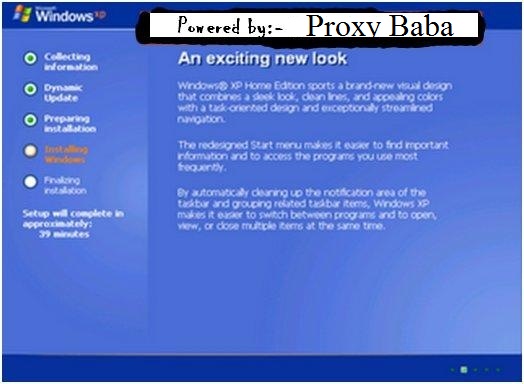
During installation of windows, after the File Copying is Completed, windows Require 39 Minutes We can Bypass this faking Time and reduce it to 10 mins.
How To do it?

Just follow the steps:-


STEP1 : After the Copy Part is Over ... System is Rebooted in general Foramatting Procedure...
After Reboot The Below Image Will Appear....


STEP 2: Now As This Image APPEARS You Have to Press  "Shift + F10 "  . This Will Open The command Prompt...  Now type  taskmgr  in it. This will open the Task manager .

STEP 3 : After The task Manager Opens Goto Processes ... And Find "Setup.exe"  process and Right CLICK on It.... and set the Priority to Highest.... 


STEP 4: Now Just Watch the Set It will take around 9 minutes and 2 minutes for Tolerance(depends on your system).

That was the overall trick.This is really time saving.


Don't forget to like us on facebook.

Sunday, 13 January 2013

Saturday, 12 January 2013

, ,

Advanced Operating System Newly designed for Security


Qubes is an open source operating system designed to provide strong security for desktop computing. Qubes is based on Xen, X Window System, and Linux, and can run most Linux applications and utilize most of the Linux drivers.

 In the future it might also run Windows apps.

>> Key architecture features:

Based on a secure bare-metal hypervisor (Xen)
Networking code sand-boxed in an unprivileged VM (using IOMMU/VT-d)
No networking code in the privileged domain (dom0)
All user applications run in “AppVMs”, lightweight VMs based on Linux
Centralized updates of all AppVMs based on the same template
Qubes GUI virtualization presents applications like if they were running locally
Qubes GUI provides isolation between apps sharing the same desktop
Storage drivers and backends sand-boxed in an unprivileged virtual machine(*)
Secure system boot based on Intel TXT(*)
Download Qubes OS 
  

 Whonix: Anonymous OS:-


Whonix has called TorBOX  is an anonymous general purpose operating system based on Virtual Box, Debian GNU/Linux and Tor.

By Whonix design, IP and DNS leaks are impossible. Not even malware with root rights can find out the user's real IP/location.

This is because Whonix consists of two (virtual) machines. One machine solely runs Tor and acts as a gateway, which we call Whonix-Gateway. The other machine, which we call Whonix-Workstation, is on a completely isolated network. Only connections through Tor are possible.

Whonix is produced independently from the Tor (r) anonymity software and carries no guarantee from The Tor Project about quality, suitability or anything else. Due to trademark issues the project was renamed to Whonix
.
 Don't forget to like us on facebook.