Showing posts with label Cool tricks. Show all posts

Sunday, 28 July 2013

,

How to Find Your Mobile in Silent Mode

Whenever you misplace your phone, the first thing you do is to give a miss call to your phone from your friend's phone. But what would you do if your phone is in silent mode. It is very difficult to find your phone in the silent mode.
Don't worry, there's a solution for it.You just need to send a SMS to your mobile and it will play an alarm loudly even if your phone is in a silent mode.This trick works in Android phones.

Follow these Steps-
  • Download and install SMS Alarm App. from Google Store.
 
  • Open this application and set the activation message. The word you enter should be easy which you may remember.
  • Also choose whether your phone should vibrate or not.
  • Whenever you misplace your phone in a silent mode, Send the SMS (the word you entered) from any other phone.
  • It will play a loud alarm and you can easily find your phone.
Don't forget to like us on facebook.

Friday, 21 June 2013

Call Anyone in the World with a hidden number

Hi friends....!
Today I am going to post a trick with which you can fool your friends.
You can call your friend with a fake Caller ID(Number).

Follow these Steps:- 

  1. Go to crazycall.net
  2. Select your country.
  3. Enter The number that you want to appear on your friends phone when he receives the call.(e.g9876543210) 
     
  4. Enter The number of the friend you want to fool or prank. eg-9501300192
  5. You can also change your voice to low, normal, High pitch.
  6.  Now click the button GET ME THE CODE.
  7. You will get a phone number and a code as shown below.  
  8. Now call to the number which you got from the site and you will be asked to enter the code. Enter the code and after 2 seconds it will connect to the friend you want to fool or prank.
NOTE:-  This service charges Rs.10 per minute.
Don't forget to like us on facebook.

Sunday, 13 January 2013

Friday, 11 January 2013

,

Chat with Friends through Command Prompt

Hi frnds..☺☺!
I am here with an amazing trick of chatting with friends through Command Prompt.

Here's the trick:-

1) You need only your friend's IP Address and your Command Prompt.


2) Open Notepad and write this code as it is.....!

@echo off
:A
Cls
echo MESSENGER
set /p n=User:
set /p m=Message:
net send %n% %m%
Pause
Goto A


3) Now save this as "Messenger.Bat".

4) Open Command Prompt.

5) Drag this file (.bat file) over to Command Prompt and press Enter.

6) You would then see something like this:


7) Now, type the IP Address of the computer you want to contact and press enter
You will see something like this:


8) Now all you need to do is type your message and press Enter.
Start Chatting.......!


You are done....!
Don't forget to like us on facebook.

Sunday, 6 January 2013

,

How to Create your own Image Emoticons on Facebook

 1. Just visit there website http://smileyti.me/
2. Now you will see page asking you to choose your image and than entering that irritating captcha you can follow below .gif image we created uploading our default website logo.


Smileyti.me-Image-Emoticons

3. Now after you upload your image you will get your code like below.
Smileyti.me-Code
4. Now that’s your final code, just copy this code and paste it in your Facebook chat and you will see your image rendering simply perfect.

Don't forget to like us on facebook.

Thursday, 3 January 2013

, ,

Download Youtube Videos without any Software

Hi friends....☺☺
Today I'm posting a trick on how to download youtube videos directly i.e. without any software.

Here's the trick:►

Suppose the link of video you want to download is:-


Just add "ss" before the link


☻☻You are done☻☻

Now you can can download the video just as you download other files.

Don't forget to like us on facebook

Monday, 31 December 2012

, ,

Change bacground image for facebook login page

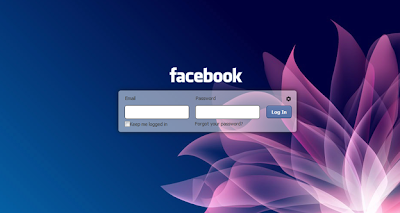
Friends you can see in the below image we have changed the background image and style of Facebook Login Page, well now I just applied some random abstract image, you can go with any one applying your personal or with friends image on the background. So now when ever any one opens Facebook.com on your PC if will be greeted by that image with options to Log-In on Facebook.


Steps to Change FB Background Image:-

1. Make sure chrome is installed now install the FB Refresh Extension.

2. After you have installed the extension now just head over to Facebook.com and you will see that page in a new way something like above but obviously not that image, 
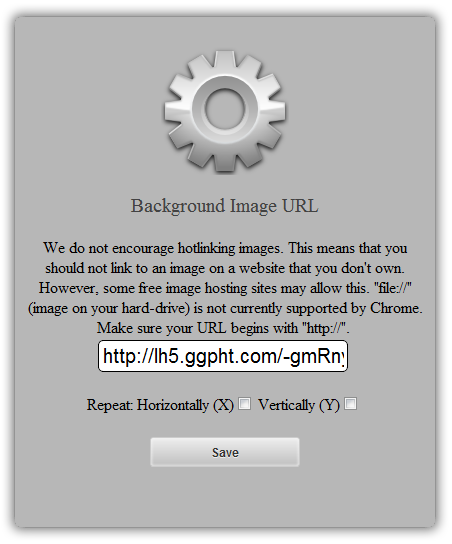
so now you have to click on the small gear icon above the Log In button.


3. Now after you click on the small Gear Icon you will see window like above asking you to insert the image URL for the image you wanna use for the background.

4. Now you can choose if you wanna repeat the image and in which direction X for Horizontal and Y for Vertical

Sunday, 30 December 2012

,

List of Facebook Emoticons, Symbols & Smileys

Facebook symbols are not part of
facebook but can be inserted into chat
window, messages, status and
comments....
Alt + 1 ☺
Alt + 2 ☻
Alt + 3 ♥
Alt + 4 ♦
Alt + 5 ♣
Alt + 6 ♠ 
Alt + 7 •
Alt + 8 ◘
Alt + 9 ○
Alt + 10 ◙
Alt + 11 ♂
Alt + 12 ♀
 Alt + 13 ♪
Alt + 14 ♫
Alt + 15 ☼
Alt + 16 ►
Alt + 17 ◄
Alt + 18 ↕ 
Alt + 19 ‼
Alt + 20 ¶
Alt + 21 §
Alt + 22 ▬
Alt + 23 ↨
Alt + 24 ↑
Alt + 25 ↓
Alt + 26 →
Alt + 27 ←
Alt + 28 ∟
Alt + 29 ↔
Alt + 30 ▲ 
Alt + 31 ▼
There are two ways for using these symbols;
  *1. Copy from here and paste in your
facebook status or message.
*2. These characters can be typed on
your keyboard using the ALT button.


Don't forget to like us on facebook